AI Writes the Doc. Your Team Edits It Live.
In short: In Bottari, a multiplayer AI workspace, a document the agent writes goes straight into your team’s database. Your teammates and the agent edit the same page live, and the next day anyone can @mention the doc to pick up where it left off.
Bottari is a workspace where a whole team works with an AI agent in the same place. You open one session per piece of work, and the session lives in your team, not on your laptop.
A lot of what comes out of those sessions isn’t code. It’s documents: plans, specs, briefs, launch checklists. AI made writing them almost free. But a document the AI writes usually sits in one person’s chat, and the rest of the team doesn’t see it until someone copies it over.
In Bottari, the moment the agent writes a document, it’s already your team’s. It goes into your team’s database, and your teammates can open it and edit it with you, live. The agent keeps editing it too.
Here’s how that goes, from the first draft to the next morning.
When the agent writes the first draft
You ask for a plan, a spec, a write-up. It has to end up somewhere your team can see.
What to do
- Just ask for it. “Write up the GTM plan” is enough. You don’t have to say where it goes.
- Watch the session. A Created page line shows up in the stream, and the document is in your team’s database.
- Name a database if it matters. Mention it in the request and the page goes there. Otherwise it goes to your team’s default.
How we used it
We worked out our go-to-market plan with the agent in a session. When we were done talking it through, I asked it to write the plan down.
It didn’t come back as a long reply I had to copy somewhere. It came back as a page in our database, next to the other plans we’d made. The team could open it right away.
Why this is easier than a chat reply
A chat reply only belongs to the person who asked. To share it, you copy it into Notion, save it as a file, or paste it into a message. A week later there’s a version in the chat, a version in the repo and a version in someone’s doc, and nobody is sure which one the team agreed on.
In Bottari there’s nothing to hand over. The plan is a team page from the moment it’s written.
When you edit it together
A document is rarely finished by the person who started it.
What to do
- Send the page, not a copy. Share the link, or point your teammate to it in the database.
- Edit at the same time. You, your teammates and the agent can all be in the page at once, and edits show up as they’re made.
- Keep asking the agent. It reads the page as it is right now and writes into the same page.
How we used it
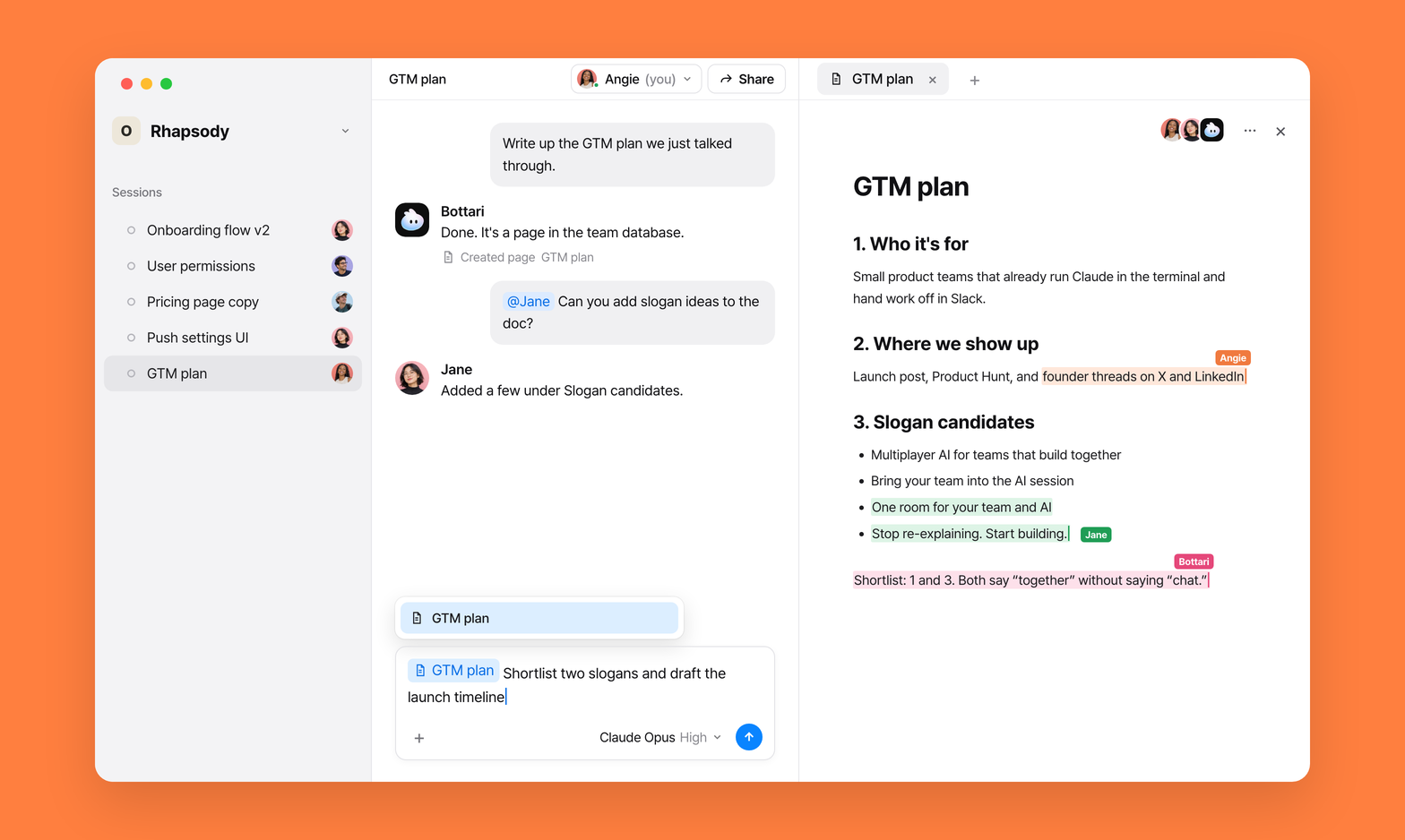
Our GTM plan had a section for slogan candidates. A teammate opened the page and added more candidates under that heading while I was working on another part of the plan.
Neither of us had to ask the other for the latest version. There was only one.
Why this is different from what you already have
People editing the same doc at the same time isn’t new. Notion and Google Docs have done it for years. What’s new is that the agent is in the page with you.
It doesn’t hand you a draft to paste in. It writes into the same page your teammate is typing in, and it only touches the parts it names. Your teammate’s slogans are in that page. The agent’s edits are in it. Yours are in it. The final version is just the page.
When you come back to it
Yesterday’s session is done. The doc isn’t.
What to do
- Open any session. Your own, a new one, or a teammate’s you can edit.
- Type
@and part of the title. Documents show up in the same list as people. - Say what’s next. The agent reads the doc before it answers.
How we used it
The next day I opened a new session, typed @ and the first few letters of the plan’s name, and picked it. Then I asked the agent to keep going.
It read the page as it was that morning, including the slogans my teammate had added, and started from there. I didn’t paste the plan back in, and I didn’t have to explain what had changed.
Why this is easier than starting over
A new chat starts empty. You either paste the plan back in or go find its link. Then you explain what changed since yesterday, because the chat has no idea your teammate added slogans overnight.
Mentioning the doc skips both. You type a few letters of the title, and the agent works from the doc itself, not from your memory of it.
Four things worth knowing
1. The agent always reads the latest version
When the agent reads a document, it gets the page as it is right now, including edits your teammates just made. There’s no sync step and no stale copy.
2. It edits blocks, not the whole page
The agent changes the parts it names and leaves the rest alone, so a teammate working on another section keeps their edits. If a block it wants to change has moved since it last read it, it reads again before it writes.
3. You can see every time it touches a doc
The session shows a line each time: Read page, Searched pages, Created page, Updated page. The session also keeps a list of every document it touched under Artifacts → Bottari documents, so you can always get from a doc back to the conversation that made it.
4. Private pages stay out of its search
When the agent goes looking for a document on its own, it only searches pages your team can see. Your private pages aren’t in that search.
If you’ve connected Notion to Claude
Notion is great at documents, and with Notion’s MCP server Claude can read and write your pages. If your team already lives in Notion, that’s a real option.
Bottari starts from a different place. Three spots where you’ll feel it:
The agent works inside the doc, not through it. Over MCP, Claude reads a page and then writes back through the API, either replacing the whole page or swapping out exact text it saw earlier. If a teammate edited that text in between, the targeted edit fails, and a full replace writes over their work. In Bottari the agent edits the same live page you’re in. You see it write, and it touches only the blocks it named.
Docs land where your team already is. With Claude, where a document ends up depends on how you asked: a reply in the chat, a file in your repo, or a Notion page if you told it to. In Bottari, asking for a document puts it in your team’s database. We made that the default after “write this up” kept turning into a markdown file in our repo.
The conversation and the doc point at each other. In Claude, the chat that wrote a doc sits in one person’s account. Tomorrow you start a new chat and paste the link. In Bottari the session lists every doc it touched, and anyone on the team can @ the doc into their own session and keep going.
AI made writing documents almost free. The hard part moved: getting the draft to your team, agreeing on one version, and picking it back up the next day.
So skip the handoff. Let the agent write the doc where your team already works, and edit it together, live.
Start working with your team and AI in one place.